ChatGPT · PRACTICAL GUIDE
Find decisions and your next action in a long email thread
Extract the original question, confirmed decisions, unresolved issues, and the action expected from you, then verify the supporting messages.
Watch the original tutorial
Open the original video on YouTube ↗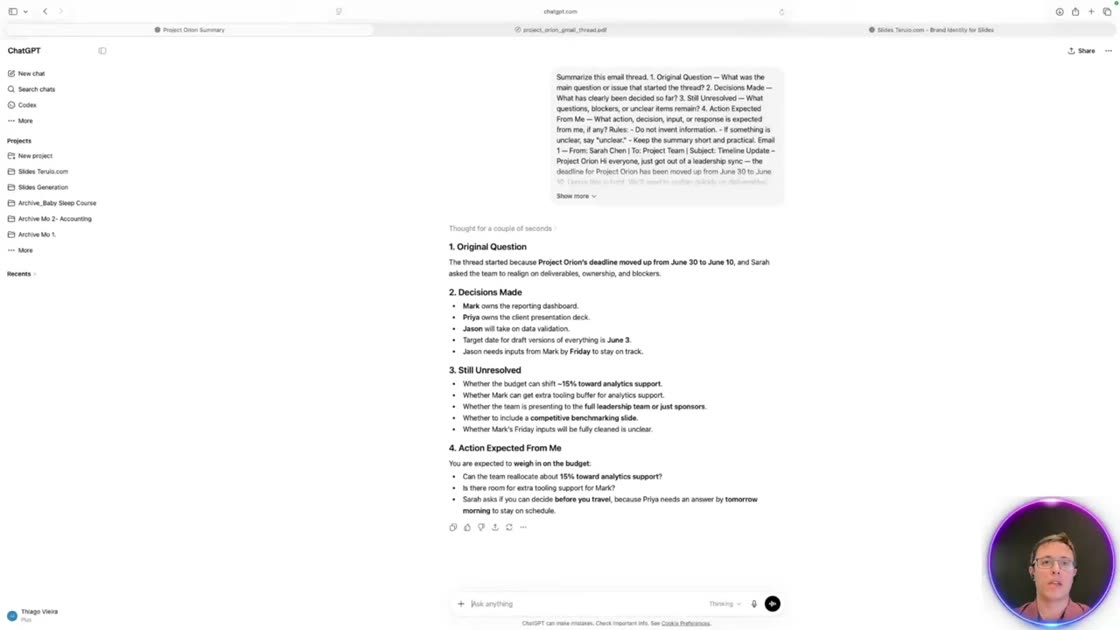
A ten-message thread ends with a budget decision due tomorrow morning. Thiago uses the Project Orion example to separate the background discussion from the reply he owes the team.
What you’ll learn
Extract the original question, confirmed decisions, unresolved issues, and the action expected from you, then verify the supporting messages.
Before you start
Use a permitted thread with message order and authors intact. Tell the assistant which participant you are.
1. Supply the complete conversation
Use a permitted copy of the thread with the relevant message order, dates, and attachments. Identify your role so the assistant can distinguish a request directed at you from another participant’s commitment. Include later corrections rather than stopping at an earlier apparent decision.
2. Ask for four distinct answers
Request the original question, decisions clearly made, unresolved questions or blockers, and the action expected from you. Tell the assistant to keep it short, use only the supplied conversation, and mark unclear information as unclear. Ask for supporting message dates so you can trace the answer.
3. Verify the buried action
Read the cited messages and the final replies. A suggestion is not automatically a decision, and a request is not proof of completion. Check who actually needs to respond and by when. Missing attachments or ambiguous wording belong in the unresolved section.
4. Draft a focused reply
After confirming the action, prepare a short reply addressing that point. The description also mentions microphone input; if using dictation, check names and dates in the captured text. Review the reply before sending it through your normal email process.
Practice exercise — Find the decision buried in Project Orion
In the recorded ten-message thread, Priya raises a 15% budget shift. A later message makes the timing of the reply explicit. Ask for four headings: Original question, Decisions made, Still unresolved, and Action for me. The action is to make the budget call by tomorrow morning. The message asking for the change does not establish that someone approved it.
Check your result
Read the two messages that establish the request and deadline. When drafting your reply, say when you can decide. Do not let a polished reply turn that commitment into budget approval.
Reuse the creator’s prompt
These instructions come from the creator’s published video description. Replace the example material with information you are allowed to share.
Summarize this email thread.

1. Original Question — What was the main question or issue
   that started the thread?
2. Decisions Made — What has clearly been decided so far?
3. Still Unresolved — What questions, blockers, or unclear
   items remain?
4. Action Expected From Me — What action, decision, input,
   or response is expected from me, if any?

Rules:
- Do not invent information.
- If something is unclear, say "unclear."
- Keep the summary short and practical.


