NotebookLM · PRACTICAL GUIDE
Prepare a source-backed briefing with NotebookLM
Use selected reports, an Audio Overview, and citation checks to prepare a briefing with clear recommendations and unresolved questions.
Watch the original tutorial
Open the original video on YouTube ↗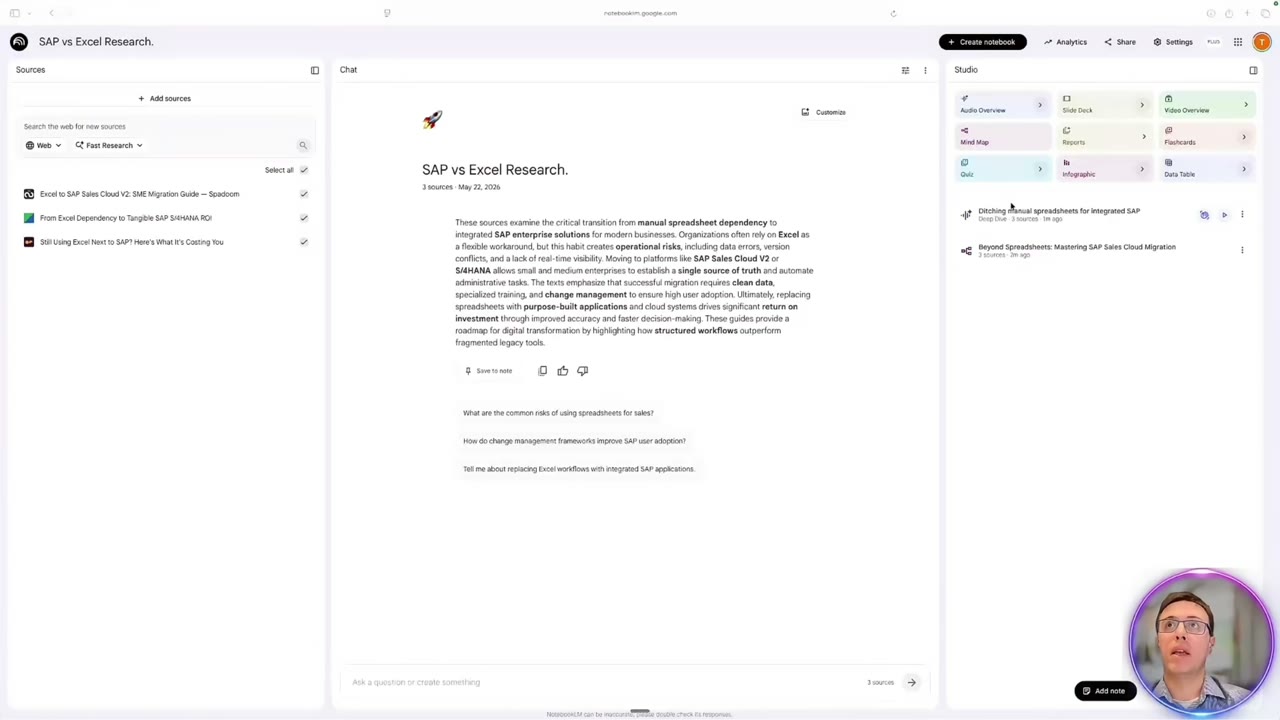
Thiago’s example begins with three reports about Excel and SAP and a request for an opinion before Monday. The workflow uses an Audio Overview for orientation, then returns to the sources to develop a written briefing. Listening helps you find the questions; checking the documents helps you answer them.
What you’ll learn
- Build a notebook around a specific research question.
- Use an Audio Overview without treating it as the final evidence.
- Compare agreement, disagreement, and gaps across reports.
- Write a short briefing with a recommendation you can explain.
Before you start
Gather the reports you are authorized to use, their titles, and their publication dates. The video calls Google’s product NotebookLM; current Google help uses the name Gemini Notebook. Its interface and available controls may differ from the recording.
Google’s Audio Overview guidance describes generating an overview from notebook sources and warns that AI audio may contain inaccuracies. Source grounding and citations make checking easier; they do not make every answer correct.
1. Create a focused notebook
Open the notebook application, create a notebook, and name it after the decision. “Excel versus SAP for project tracking” is more useful than “Research.” Add the selected reports as supported files or web sources.
Confirm that each intended source imported successfully and contains the material you need. A link behind a login or an incomplete extraction may not provide the full report. If necessary, use an authorized file copy and compare its contents with the original.
Write the research question in plain language. Are you choosing a tool, identifying implementation risks, or preparing questions for an expert? A precise question prevents a general summary from becoming a substitute for the decision.
2. Listen for orientation
Generate an Audio Overview from the selected sources. In the video, Thiago chooses a deep-dive format and focuses on risks associated with manual spreadsheet entry. Use the customization controls available in your account to emphasize your actual question.
Listen during a suitable break or walk, and note unfamiliar terms, disagreements, and claims that sound surprising. Treat those notes as a reading list. The audio is a convenient introduction, not proof that all important details were included.
3. Compare the documents in chat
Return to the notebook and ask for a structured comparison. This adapted prompt captures the video’s approach:
Using only the selected reports, list the key claims, where the sources agree, where they disagree, the risks they identify, and important unanswered questions. Cite the source passage for each point. If a question is not answered by the reports, say so. Keep the authors’ claims separate from your interpretation.
Open the citations behind the central claims. Check that the quoted passage supports the conclusion in context. Look for publication dates, qualifications, sample limitations, and conditions that a short summary may omit.
4. Use a mind map if it helps you organize
The video also generates a mind map. Use it to see how themes relate, then return to the documents for evidence. A tidy branch structure does not establish which option is better.
Identify the few themes the briefing must address. For a software decision, those might include existing processes, data quality, implementation effort, and unresolved requirements. Do not let the map introduce criteria that the reports never discuss without marking them as additional questions.
5. Draft a two-page briefing
Ask for a short briefing containing the decision, supported findings, tradeoffs, open questions, and a proposed next step. Keep citations attached while you edit.
Write or revise the recommendation yourself. Explain which evidence matters most and what information would change your conclusion. If the sources cannot support a selection, recommend the next investigation or trial rather than inventing certainty.
Before the meeting, practice explaining the recommendation without reading the AI answer. Keep the source list available so a colleague can inspect a disputed point.
Common questions
Can a cited answer still be wrong?
Yes. The citation may support only part of a statement, or the interpretation may be too broad. Read the passage and surrounding context.
What if the sources disagree?
Preserve the disagreement and identify differences in scope, date, or assumptions. A useful briefing can explain uncertainty without forcing consensus.
When your briefing is ready, use the presentation workflow to turn it into a concise slide story.
Product naming update
Google renamed NotebookLM to Gemini Notebook in July 2026. The recording uses the earlier name. Read Google’s announcement.