Microsoft Copilot · PRACTICAL GUIDE
Compare supplier quotes and prepare a decision with Copilot
Check price, shipping, delivery constraints, and approval timing before turning supplier quotes into an action plan and manager briefing.
Watch the original tutorial
Open the original video on YouTube ↗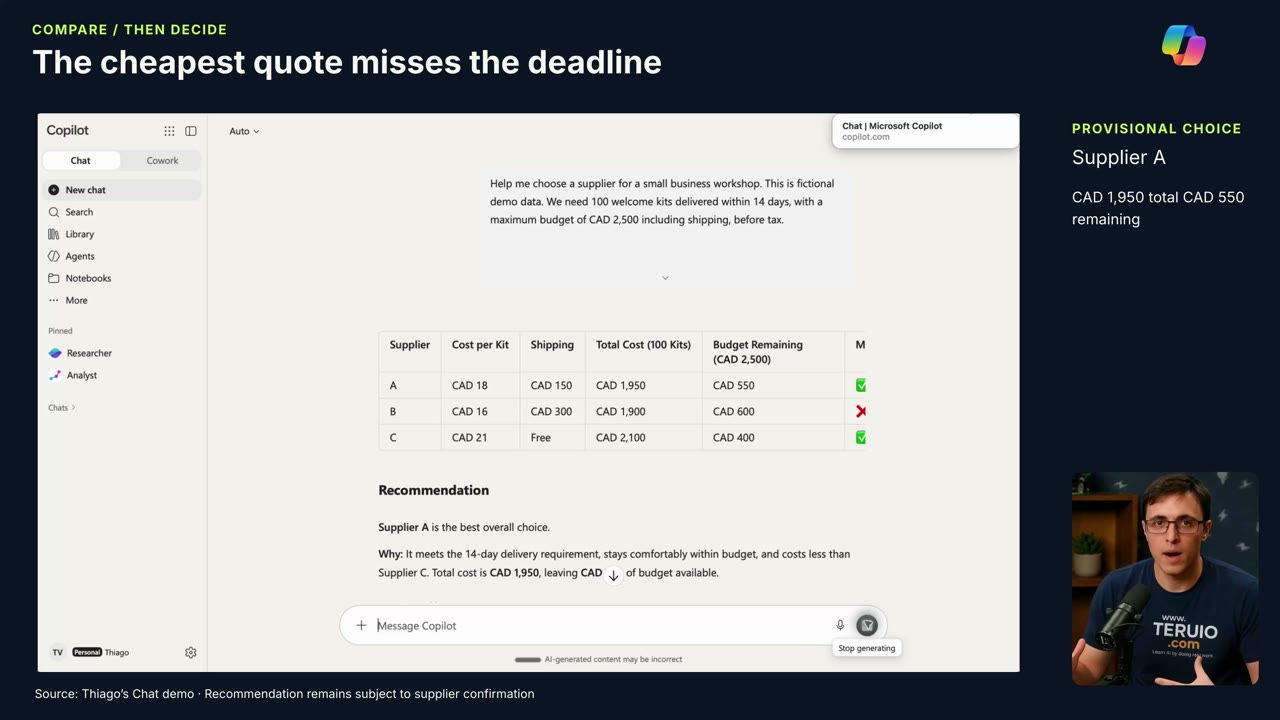
The lowest quote can be the wrong choice when it misses the delivery deadline. In Thiago’s demonstration, Copilot compares fictional suppliers for 100 workshop welcome kits, with a budget of CAD $2,500 before tax and delivery required within 14 days.
The useful part of this video is the completed chat example: quotes become a comparison, an action plan, an email draft, and a manager briefing. The video also discusses announced features; those previews are not prerequisites for this guide.
What you’ll learn
- Turn a business request into explicit comparison criteria.
- Check arithmetic and delivery assumptions.
- Prepare follow-up questions before committing to a supplier.
- Reuse a verified comparison in several practical outputs.
Before you start
Use fictional quotes for practice or approved business information for real work. Gather quantity, unit price, shipping cost, stated delivery time, and payment terms. Record the quote date and any conditions separately.
Do not fill gaps with guesses. If tax, shipping, or delivery timing is unspecified, mark it unknown. The example’s budget is before tax; your real comparison must use a consistent basis across every option.
1. State the decision and constraints
Give Copilot the quantity, deadline, budget, currency, and the supplier details. Ask it to explain its calculations and separate requirements from preferences.
Compare these quotes for [quantity] kits needed by [date], with a budget of [amount and currency] on a [before-tax/after-tax] basis. Show unit cost, item subtotal, shipping, total, payment terms, and delivery feasibility. Identify missing information and explain which options meet every requirement. Do not assume what starts the delivery clock. Quotes: [paste details].
A fixed date is often clearer than “within 14 days.” State whether supplier lead times use business or calendar days when the quotes establish that distinction.
2. Check the comparison yourself
Recalculate quantity multiplied by unit price, then add the applicable charges. Check that every quote uses the same units and currency. Confirm that a low price has not hidden a late delivery or a minimum-order condition.
In the fictional example, the cheapest option cannot meet the deadline. Copilot recommends Supplier A at CAD $1,950, leaving CAD $550 within the stated pre-tax budget. Those figures belong to the demonstration; substitute your own verified numbers.
3. Identify what could invalidate the recommendation
Thiago highlights the approval delay: if the team takes too long to approve an order, the delivery buffer shrinks. Ask when the supplier starts counting lead time. It could depend on order confirmation, artwork approval, payment, or another condition that must be confirmed directly.
Ask Copilot to list assumptions behind its recommendation. Separate a stated promise in a quote from a conclusion the model inferred. Keep an alternative option visible if a key assumption cannot be confirmed.
4. Draft the follow-up and action plan
Ask for an email that confirms the unresolved details, including the total, delivery commitment, and payment terms. Review the recipient, numbers, dates, and wording before sending it through your normal process. The video creates a draft and places no order.
Next, request an action plan with tasks, proposed owners, and target dates. Label owners as proposed until the team agrees. Include approval, supplier confirmation, and delivery checking as separate steps so the plan does not treat a recommendation as a completed purchase.
5. Write a short manager briefing
Summarize the required outcome, qualifying options, recommended supplier, budget position, and main risk. End with the specific decision or approval needed and the date by which it matters.
Compare the briefing with the original table one last time. Reusing a conversation helps retain context, but a later draft can still change a number or omit a condition. Keep the quotes and reviewed comparison with the decision record.
Common questions
Do I need Code, Autopilot, or another preview feature?
No. This guide follows the chat comparison demonstrated in the video. It does not depend on the announced experiences discussed later.
Can Copilot confirm that a supplier will deliver?
It can organize the information supplied. Obtain confirmation from the supplier and check the actual purchasing requirements before committing.
For a broader review across several files, see the document and budget dashboard guide.


